
Last updated: October 21, 2026
What a joint certificate is
A joint certificate is an electronic certificate that proves who you are online. Securities firm Daol Investment describes it as having the same legal effect as your signature. It is a file you keep on your phone, computer or a USB stick, protected by a password you choose.
You will see two names for it:
- Joint certificate (공동인증서): the current name. Citibank Korea's certificate center adds "formerly public certificate (구 공인인증서)" next to it.
- Public certificate (공인인증서): the old name. Older English guides, including some university and research institute pages, still use it.
Banks issue it through yessign, the certificate service of the Korea Financial Telecommunications & Clearings Institute (금융결제원, KFTC). Securities firms issue their own through Koscom's SignKorea.
What you need as a foreigner
There is no separate "foreigner certificate." You get the same certificate as Koreans, and the hard part is the step before it: being enrolled in your bank's internet banking.
| Requirement | Why it matters | Notes from bank pages |
|---|---|---|
| Residence Card (외국인등록증) | Internet banking enrollment asks for it | KB Kookmin's app accepts a Residence Card, permanent residence card or overseas Korean residence report card, and the mobile ID version. A foreign passport is not accepted in that app |
| Korean bank account in your name | The certificate is issued by the bank that knows you | Any bank works. You issue the certificate at that bank |
| Internet banking enrollment | The certificate menu sits inside internet banking | Woori Bank enrolls foreigners at a branch with a passport or Residence Card |
| Phone line in your own name from a Korean carrier | Extra identity checks use your phone | KB says foreign carriers and prepaid SIMs usually fail the phone check |
| Name spelled the same everywhere | Bank, carrier and ID must match | KB says spelling and even spacing must match |
If you opened your account with a passport and got your Residence Card later, update the bank first. Woori Bank asks you to bring both documents to a branch in that case.
Show this: 인터넷뱅킹 가입하고 공동인증서 발급하고 싶어요.
Fees: the free type is enough for most people
Bank pages split personal certificates into two types.
| Type | What it covers | Fee | Valid |
|---|---|---|---|
| Bank, credit card and insurance use (은행/신용카드/보험용) | Internet banking, online insurance, online card payment, e-government services | Free | 1 year |
| General-purpose (범용) | Everything above plus online stock trading | ₩4,400 a year including VAT | 1 year |
KB Kookmin and Hana Bank both list these two fees for individuals. A few points to know before you pay for the general-purpose type:
- You probably do not need it. Hana Bank lists e-government services under the free certificate, and KB lists e-government services under both types.
- Some banks do not issue it to new customers. Citibank Korea and Hana Bank say new issuance of KFTC's general-purpose certificate has been limited since July 1, 2006, to people who already had one before then.
- Stock trading has its own route. Daol Investment says a bank-only certificate cannot be registered at a securities firm; you issue a new one there instead.
How to issue it in a bank app
Every bank has a certificate center (인증센터) in its app and website. The menu names differ, but the steps are the same. Here is the path in KB Kookmin's KB Star Banking app, from KB's own guide:
- Open the menu (☰), then Authentication/Security (인증/보안).
- Under Other certificates/security media (다른 인증서/보안매체), tap Certificates (인증서).
- On the Joint certificate (공동인증서) tab, choose Issue/Reissue (인증서 발급/재발급).
- Agree to the terms and enter your user details.
- Pass the extra identity check by phone or ARS call. If you are abroad, KB also offers a departure-record check.
- Set a certificate password of at least 10 characters that mixes letters, numbers and special characters.
At Woori Bank, go to the certificate center's issue/reissue menu on wooribank.com, or use the Woori Global or Smart app on your phone. Hana Bank's Hana EZ app, built for foreign customers, supports certificate issuance in 16 languages, according to a 2024 Korea JoongAng Daily report.
Have your security card or OTP ready. Banks use it for transfers, and KB accepts it for the identity check when you renew.
One certificate, many banks
Hana Bank's guide says a person can hold only one certificate of each type across all banks: one free certificate and one general-purpose certificate. If you have accounts at two banks, issue it at one and register it at the other through Register certificate from another bank (타행/타기관 인증서 등록).
You can also copy it between devices. Bank certificate centers have export and import menus (내보내기/가져오기) to move it from your phone to your PC or a USB stick and back.
Validity and renewal
| Rule | Detail |
|---|---|
| Validity | 1 year from issuance |
| Renewal window | From 30 days before expiry until the expiry date (KB, Hana) |
| Where to renew | Only at the bank or institution that issued it (KB) |
| Missed the date | Issue a new one through the same issue/reissue menu |
| Forgot the password | Issue a new one through issue/reissue (KB) |
KB also notes that on the day you issue, reissue or renew a certificate and the day after, you cannot apply for a loan in its app or internet banking.
Where you will use it
| Service | What you do there |
|---|---|
| Internet and mobile banking | Log in, sign transfers, register other banks' certificates |
| Hometax (홈택스, National Tax Service) | Log in for year-end tax settlement (연말정산) and tax documents. Hometax also offers other login methods |
| National Health Insurance Service | Issue documents such as insurance qualification records |
| Government24 (정부24) | Some services need simple authentication or a certificate (joint or financial), even for non-members |
| HiKorea e-application | The Guro District Office guide to online change-of-address reports lists applying a bank-issued certificate as a step |
| Insurance companies | Online subscriptions and contracts |
Hana Bank says its joint certificate can be used for document issuance from the National Tax Service and National Health Insurance Service, insurance subscriptions and year-end tax settlement.
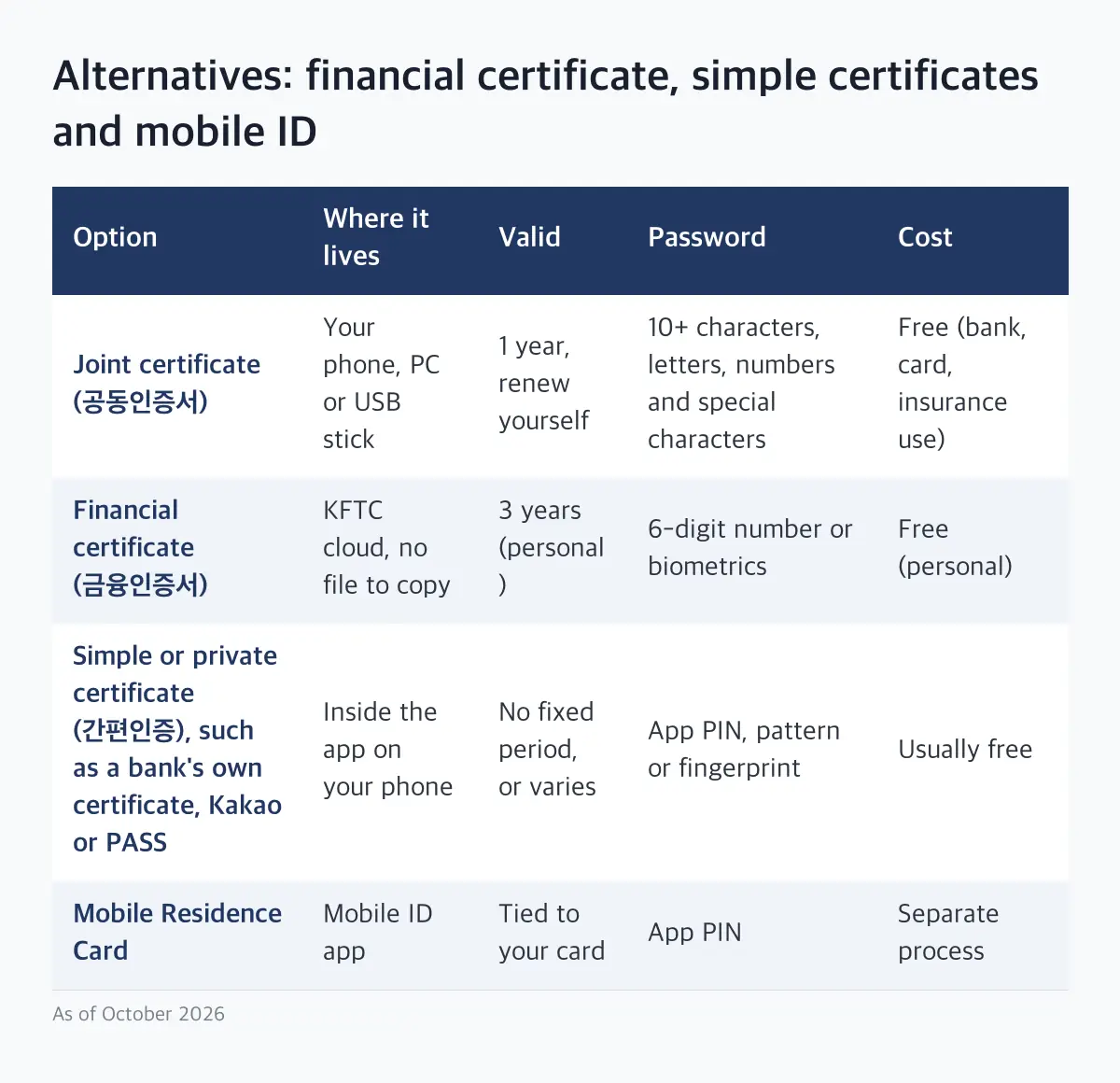
Alternatives: financial certificate, simple certificates and mobile ID
Each site supports different methods. A Samsung support page that uses Hometax as its example says the certificate types accepted differ by site, so check the login screen before you issue anything.
| Option | Where it lives | Valid | Password | Cost |
|---|---|---|---|---|
| Joint certificate (공동인증서) | Your phone, PC or USB stick | 1 year, renew yourself | 10+ characters, letters, numbers and special characters | Free (bank, card, insurance use) |
| Financial certificate (금융인증서) | KFTC cloud, no file to copy | 3 years (personal) | 6-digit number or biometrics | Free (personal) |
| Simple or private certificate (간편인증), such as a bank's own certificate, Kakao or PASS | Inside the app on your phone | No fixed period, or varies | App PIN, pattern or fingerprint | Usually free |
| Mobile Residence Card | Mobile ID app | Tied to your card | App PIN | Separate process |
A few details that matter when you choose:
- Financial certificate: KB says it stays only in KFTC's cloud and cannot be copied to a USB stick. If you issue one at a new bank, the one from your old bank is cancelled automatically.
- Bank simple certificates like KB's KB Certificate (KB국민인증서) log you in with a PIN, pattern or face ID, and KB says it also works on Government24. You can hold it at the same time as a joint certificate.
- Mobile Residence Card: KB's app accepts the mobile ID version of your Residence Card when you open an account.
A practical setup for many residents: keep the free joint certificate for Hometax and HiKorea on a computer, and use your bank's simple certificate or a financial certificate on your phone.
Common problems for foreigners
- The phone check fails. Your line may be prepaid, from a foreign carrier, or in someone else's name. Move to a line in your own name first.
- Your name does not fit. The Korea Times reported that many banks limit names to 20 characters, which can break text-message checks. Ask the bank and carrier to register the same spelling as your Residence Card.
- The app sends you to a branch. A KB official told The Korea Times that Residence Card holders can verify remotely with the bank's own certificate, but some passport holders must visit in person depending on their country.
FAQ
Can I get a joint certificate with only a passport?
It depends on the bank. KB's app needs a Residence Card or another Korean-issued ID, while Woori Bank enrolls internet banking at a branch with a passport or Residence Card. Ask your branch before you go.
Is the joint certificate the same as the public certificate (공인인증서)?
Yes. Public certificate (공인인증서) is the old name. Banks now call it the joint certificate (공동인증서) and often add "formerly public certificate (구 공인인증서)" next to it.
Sources
- KB Kookmin Bank: Joint, financial and KB certificates guide (KB의 생각)
- KB Kookmin Bank: Opening an account as a foreigner (KB의 생각)
- Hana Bank: Certificate guide and fees
- Citibank Korea: Certificate center, personal issuance
- Woori Bank: Banking guide for foreign customers
- Daol Investment & Securities: Joint certificate guide
- yessign (KFTC) certificate portal
- Samsung Service: Logging in to government and financial sites with a certificate
- Government24: Foreigner registration service page
- Guro District Office: Online change-of-address report for foreigners
- Korea JoongAng Daily: Hana EZ app certificate access for foreigners
- The Korea Times: Foreign residents and online financial services
This guide is general information, not legal or financial advice. Bank menus and fees change, so confirm with your bank's certificate center (인증센터) before you issue or pay for a certificate.
Related guides
 Korean Phone Number for Verification: Must Be in Your Own NameWhy Korean apps ask for identity verification (본인인증), which methods work for foreigners, and why tourist SIMs,…
 Open Bank Account in Korea Foreigner Guide: Passport Works at a Branch, ₩1,000,000 Daily LimitCan a foreigner open a bank account in Korea without a Residence Card? Yes, at a branch with a passport and proof of…
 HiKorea Address Change: Report Within 15 Days, Free, Online (Foreigners)You moved to a new place in Korea. Here is where to report your change of address, what to bring, how the HiKorea…